Portfolio of Steersman ecommerce client websites running on Odoo

Legion Safety
Distributor and online retailer of safety and PPE supplies. Servicing a variety of manufacturing, construction, agricultural and other service/production companies, they use Steersman’s Odoo ecommerce and ERP to run their catalog of 35,000+ products.

Sciencix
Manufacturer and worldwide supplier of high-quality laboratory equipment parts and consumables for medical and scientific labs. Delivering the best quality at the best price for their catalog of 600+ unique products via an optimized ecommerce and fully integrated Odoo ERP solution managed by Steersman.

Trim Illusion Distributors
Makers of high-quality aftermarket automotive trims to personalize cars. Selling to dealers, resellers, shops, and consumers, they use Steersman’s Odoo ecommerce and ERP to run inventory, accounting, ecommerce, CRM/sales, and quality control.

Irontite
Manufacturer of “Crack Detection and Repair” products and specialty “Diesel Tooling”. Created to service the engine rebuilding industry, these products have since become staples in garages and mechanic shops. Irontite uses Steersman’s Odoo ecommerce and ERP to run inventory, accounting, manufacturing/kitting, ecommerce, CRM/sales, and quality control.

Oldani Brothers
Specializing in unique custom trophies and gifts, Oldani Brothers have mastered creating high-quality silver and pewter awards and specialty pieces. They run their custom-created inventory using Steersman’s Odoo ecommerce and ERP.

Great American Inc
The top choice for OEM and aftermarket heavy-duty parts, tools, and hydraulic hosing, Great American Inc has grown in both product breadth and service area to be your total parts solution expert. Great American Inc uses Steersman’s Odoo ecommerce and ERP to run inventory, accounting, sales, purchasing, PIM, website, manufacturing, and product cores for their online website and brick-and-mortar locations.

Challenge
Legion noticed that the variety of disparate solutions that they were using to run their business was leading to inefficiencies, errors that needed to be quickly dealt with, as well as loss of revenue. They needed a single robust solution that would streamline their operation with a great integrated ecommerce.
Solution
Steersman developed customizations specific to Legion’s needs for their cloud hosted Odoo solution and created data migration scripts to facilitate a smooth transition. They also designed and built a custom website optimized for desktop and mobile use, making sure that the brand was accurately represented, and the site was easy to navigate.
Result
The consolidation of all the various tools onto one platform proved to be a huge improvement to everyday operations. The attractive new website has become a significant source of income and with all the data now centralized, the team can track trends, improve fulfillment, and better anticipate the needs of their customers.

Product page
- Display product attributes such as size, length, color, etc. in a simple and attractive fashion
- Link images to specific attributes or display a single set of pictures
- Format product details text with markdown, insert videos, link to documents,
- Display SKU/MPN/OEM and internal part or item numbers

Category tiles
Create and manage product categories easily with Steersman’s powerful PIM application and assign descriptive images to each one. Category tiles will dynamically display to aid catalog navigation on any screen size or shape.

Category page
- Provide as little or as much descriptive text for each category to introduce the products and improve SEO
- Format description text with markdown, embed videos, link to documents and more
- Display product cards with either smaller images and descriptive text for SEO (as seen here) or larger images and product titles only
- Add products directly to cart from the category page to speed up the ordering process
- Product cards resize/reorganize dynamically to look great on both mobile and desktops
- Sort the list of products within the category by popularity or by price
- Smart product filters ensure that a customer never ends up on an empty page without products

Cart
- The slide out cart is always available from the icon at the top right corner of the menu
- The cart is displayed each time an item is added to it, with a brief description of the most recent item added temporarily highlighted at the top
- Each item in the cart displays a small product image, any internal references or SKU/MPN/OEM information, as well as any attributes selected
- Easily remove items or modify the quantities desired directly in the cart
- Applied coupons show up directly in the cart as well along with any descriptive text provided
- Depending on your coupon setup, you can layer coupons, apply promotions or remove coupons to apply different ones directly in the cart
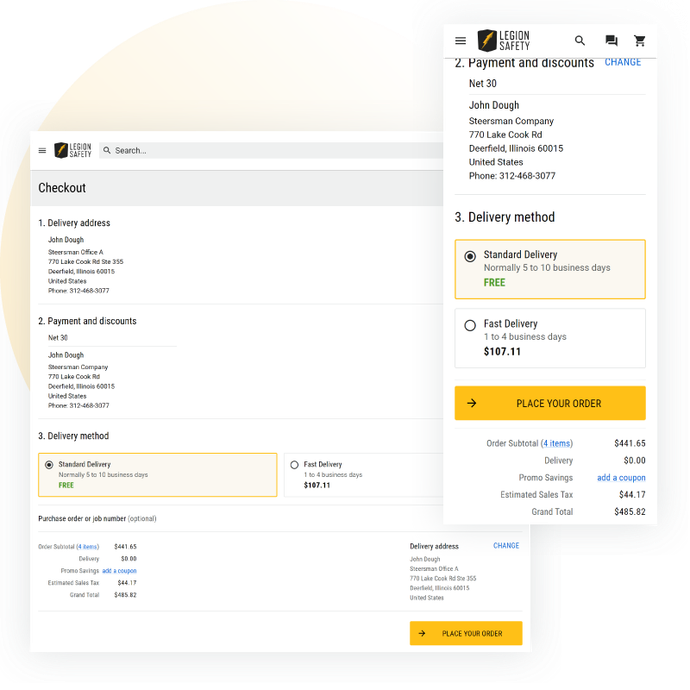
Checkout
- Enter delivery information or select from a saved address book
- Enter new payment information, select a saved card from your wallet or select payment terms if applicable
- Display a single delivery method or let your customers select from a list of configured options
- Clearly show price breakdown including shipping, discounts, sales tax and total
- Enable an optional field that lets your customers assign a PO number to the order

Account
- Manage address book, payment methods, and account information with ease
- Access current orders for up to the minute status reports

Order history
- View all previous orders for quick and easy reordering or accounting
- See exactly what was ordered, how and when with just a few button clicks

Blog
- Introduce the page with an eye-catching banner
- Organize your blog articles into categories and display those categories as links
- If a header image was provided for the blog post, include it in the card on the page
- Display a short description along with author and date published for better SEO
- Dynamic card-based layout adjusts for every screen size making even cards without images look great on the page

Challenge
Sciencix noticed that they were regularly struggling to fulfill last minute orders received near end of day. The platform and tools they were using were adequate at inception but did not scale well with the company’s growth. They needed to make their ecommerce solution more manageable, improve their site navigation and ultimately increase sales.
Solution
With Steersman’s customized Odoo ERP, the client was able to integrate all sectors of their operations to one platform and provide a better user experience for both customers and employees. The powerful search and parts selector features on the website ensured that customers could easily find exactly what they were looking for.
Result
Steersman’s website design, ERP improvements and their ability to incorporate the client’s proprietary functionality into the new and fully integrated ecommerce solution provided a more intuitive user interface, helped improve shipping times, reduce costs, increase sales and boost profits.

Selector
Quickly find the replacement parts needed by selecting the exact machine brand and model. Products needed can also be found by going through the menu, but the selector expedites the process for users who know exactly what they’re looking for.

Search
Robust search functionality that makes finding the right product fast and easy.
- Auto-complete predicts what the user is searching for as soon as they begin typing by recognizing product names, categories, product numbers and other terms relevant to the site’s content
- Auto-suggest provides helpful alternatives or additional suggestions to what the user entered into the search box
- Auto-correct will help sort out any misspelled words entered so that the user always finds what they’re looking for, even if they aren’t sure of the correct spelling
Suggested products and categories show up directly in the search bar letting the user click on them directly once a match is identified.

Menu
Organize your catalog into logical categories and the top two levels will be displayed in the dropdown menu to get the users started. If there are deeper category levels, the user will be taken to a category page to further narrow down their search.

Challenge
The client was looking to improve and consolidate their ERP solution as well as enhance the capabilities of their website. Trim Illusion needed a solution that would incorporate the automotive aftermarket standard data and make it easy for their customers to know that the products they were buying would fit their specific vehicles.
Solution
Steersman developed a custom Odoo app to seamlessly incorporate vehicle data from ACES and PIES so that all attributes and vehicle compatibility could be properly mapped during the import of the client’s catalog. Steersman also built a vehicle selector feature for the custom ecommerce site which enabled customers to filter products by vehicle.
Result
Steersman’s fully integrated suite of tools, up-to-date vehicle data and easy-to-navigate ecommerce website allowed the client to simplify many of their operations and significantly increase their online sales. Trim Illusion could now focus on expanding their client base and product catalog knowing their business growth was fully supported.

Automotive Selector
Similar in function to the selector introduced above for Sciencix, a selector designed specifically for automotive industry allows users to select vehicle year, make, model and sub-model to filter the catalog to just the compatible products.

Category Selector
Quickly and easily filter down to the parts compatible with your vehicle using the category select in the side menu. Only options that have products associated with them show so users never end up on empty product pages.

Compatibility Chart
Display an easy-to-read compatibility chart on relevant product pages along with a detailed specifications chart to ensure that your customers know exactly what they’re getting and whether or not the product fits their vehicle.

Challenge
Irontite needed to streamline its ecommerce operations. They had multiple websites, some with overlapping content, and products were unorganized. Irontite is also the parent company and manufacturer of Kwik-Way and Van Norman; they needed a way to show customers that these companies are under the Irontite brand but are separate entities.
Solution
Steersman improved the shopping experience with ecommerce tools that better organize and allow for better search results. Kwik-Way and Van Norman are now associated with Irontite with subdomains, separate landing pages, and branding.
Result
The consolidation of the three brands now offers a cohesive, all-in-one shopping experience for online customers; customers can easily navigate for products and information in different ways. Ironite now also has a way to display its numerous pages of informational guides, manuals, and support videos.

Multi-Branded Header
Quickly switch from multiple “brands” within your company; while clearly showing these companies fall under the same umbrella.

Item Carousel
Great way to highlight featured items, new products, special promotions, or specific product lines. Great for SEO and promoting particular products. Make the title plain text or a link to a relevant category page.

Newsletter sign-up
Easily collect customers’ emails and keep them engaged with company emails.

Linked documents for products
Attach valuable materials and documents, such as manuals and guides, to better assist customers’ shopping experience.

Challenge
Oldani Brothers required a way for customers to purchase an item without first having a consultation. Oldani Brothers needed to show their many customizable options and give customers a sense of what these items may cost. Oldani Brothers also wanted to highlight their images by setting them against a dark-themed website- this meant making sure all parts of our ecommerce continued working seamlessly.
Solution
By clearly showing all the choices on the product page, customers can easily click and choose to see what fits their aesthetic and budget. Creating a dark theme was more than just inverting colors; ensuring the contrast and shades were not too harsh between the dark and light components was essential.
Result
Customers can choose from options to understand what their customized trophy will look like along with the cost. Now, customers can purchase an award and start the conversation quickly to customize their trophies further. The dark theme allows the products to take center stage.

Dark theme
A simple and logical dark theme further emphasizes brand and aesthetics.
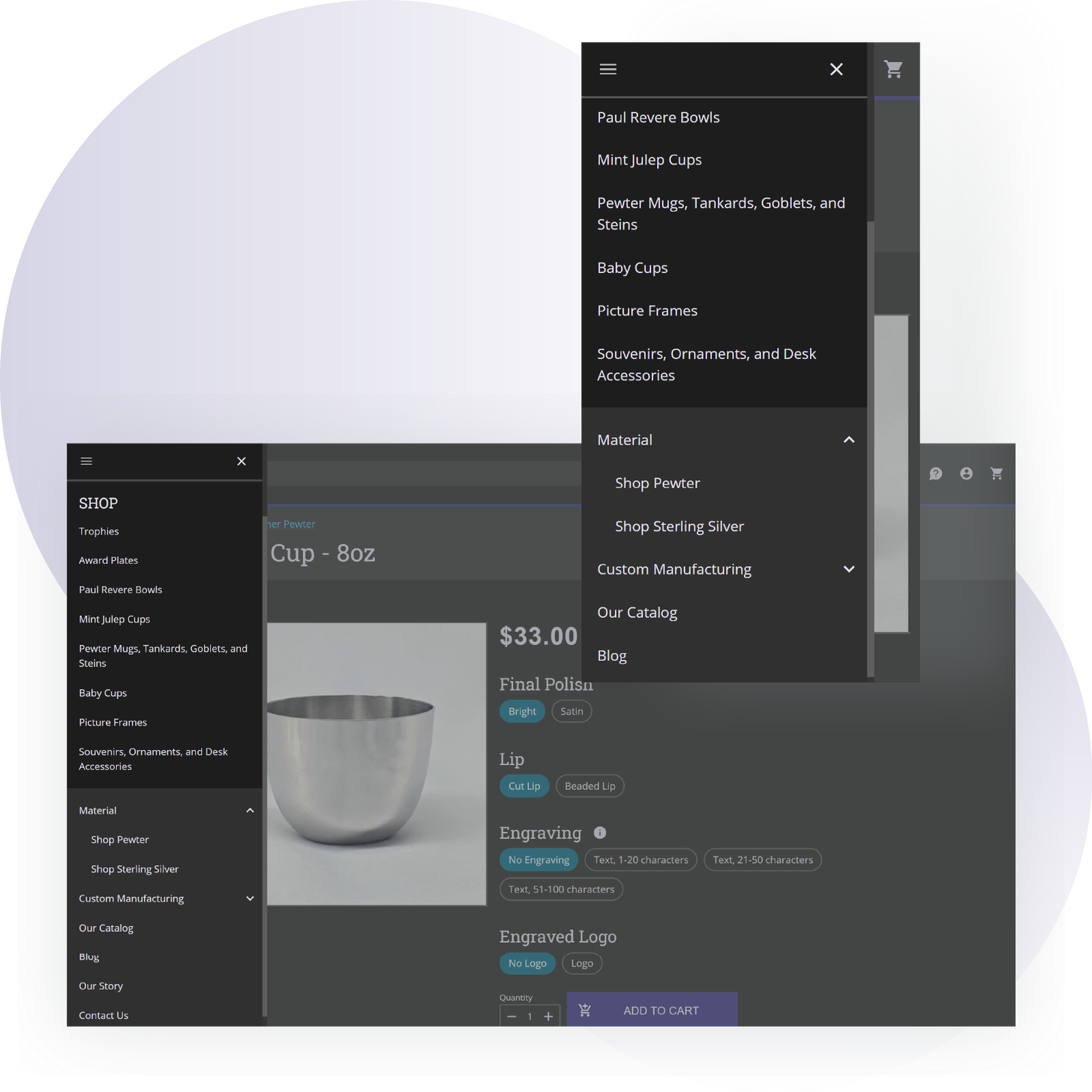
Nested submenu
Group items in the collapsible submenu to save space and help customers easily find what they want.

Challenge
GA was using a legacy system for order processing, with limitations on what could be improved. With a catalog of close to a million products, there wasn’t an easy way to list and sell products online to the public, with the company relying on a login-only purchasing portal and a non-integrated website with a small catalog. Additionally, price management for an extensive catalog with multiple special discounts for specific customers and customer groups was very manual and labor-intensive.
Solution
Steersman adapted Odoo to support product cores, enabled it to process all kinds of orders in a single interface (walk-in store orders, phone orders, online orders, etc.), and set up an ecommerce site to publish products right from Odoo and to capture orders and carts as live Odoo SO’s. Products are now priced using the advanced pricing engine that Steersman developed, dynamically determining margins, markups, and discounts on products and product selections, considering MAP prices and discount agreements for various customer types.
Result
Odoo supports all order and catalog management operations that the company performs. Price management became largely automated, with sale prices staying “live” depending on vendor prices and margins logically set per rules. All are consolidated.

Custom inventory availability messages
Correctly show product availability with custom messages. Standard messages include “In Stock, “Low Stock,” and “Out of Stock.” You can also specify if there is a certain amount in stock or “under” a certain amount, for example, “Less than 10 left in stock”. You can also inform customers on estimated shipping times on certain products, “Usually ships within 3 days”, “Usually ships within 7-14 days”, etc.

Core prices on product pages and in the cart
Clearly display core charges under the price and when the product is added to the cart. Clicking the information icon to the right provides more context in a popup modal.

Dynamically created search engine optimized (SEO) names for categories and brands
When applying filters for brands and categories, Steersman’s Odoo dynamically creates SEO-friendly category titles.

Auto-created pricing groups for price shopping
Dynamically created price ranges depending on the product’s prices in their category; no need to manually define price ranges!

Top header text bar
Display an important message at the top of your page. This bar will always be displayed above the navigation bar.

Collapsible navigation bar
- Get your customer’s attention by highlighting links on the desktop.
- Collapses on mobile to not take away crucial real estate from the focus on the homepage. *Links are always in the hamburger menu.

Brands page
A brand page that automatically populates with your brands.