Debug Mode: Access to Technical Features and Information

What is Debug Mode?
Debug mode, also known as Developer Mode, provides users with additional tools, technical features, and information in Odoo that is not visible when interacting with the ERP as a regular user.
So, you are probably wondering, what value does this mode bring to you? Well, I can list a few:
- Manage your stages in the CRM
- Turn Odoo Tours off
- Create your own Financial Reports in Accounting
- Access technical settings and translations in Settings - Outgoing Mail Server - Incoming Mail Server - Server Actions / Scheduled Actions - User Defined-Defaults
- Access user groups and technical permissions for internal users
- Manage tags and planning types for Employees

How do I access Debug Mode?
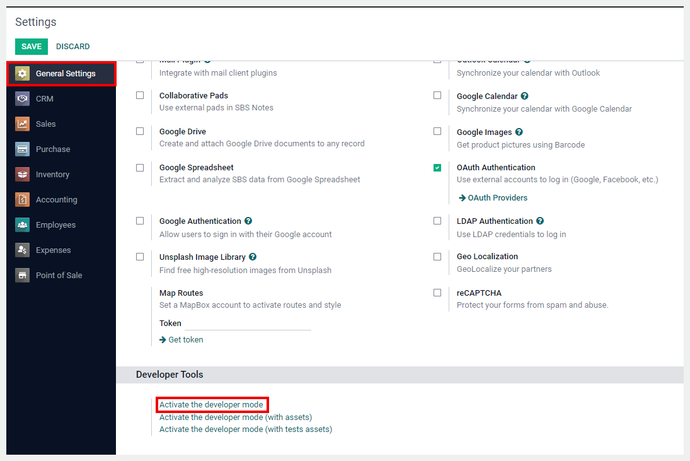
There are several ways to access this mode, and one of them requires you to go to the Settings app and scroll to the bottom of the General Settings section. Then click Activate Developer Mode.
The other option you have is to go to the URL; after web insert ?debug=true, then hit enter. It should look something like this:

You could also insert ?debug=1 after web, and the result will be the same.

You should then see a bug icon appear on the top right of your screen. This means that you are now in debug mode.

How do I leave debug mode?
This is very simple; you can use any of these methods to exit debug mode, regardless of how you entered it.
Option 1: Go back to Settings, and scroll down to the General Settings section and select Deactivate Developer Mode.

Option 2: In the URL, change it to ?debug=0

Or Option 3: In the URL, change it to ?debug=false

Related posts

User Restricted Access for Product Moves
Discover Steersman's exclusive "Quality Director" customization, enabling designated users to handle transfers from the quality hold location.

Recalculate Product Website Slugs to Match Product Name
Recalculate your product website slugs as often as needed to enhance SEO, improve clarity and consistency, for tracking and analysis, etc.

Odoo User Permissions
Understanding the Basics of Assigning User Permissions in Odoo

Apply Partial Credits Memos to Invoices and Bills
Another steersman payment enhancement that makes payment reconciliation and credit management easier.